Use the service layer to keep local runtime work attached to the workstream.
Polystro is most useful when the app can see the same frontend, backend, and preview state your agents are acting on. The service and preview surfaces exist so you can scan, launch, inspect, and route those pieces without leaving the shell.
Scan The Workstream
Start by scanning the current workstream for recognized local services. This is how Polystro discovers candidates for routed previews and service control inside the shell.
Start Services
Launch services from the service surface so Polystro can start them in the correct workspace context and maintain routing information for the workstream. Dependency-aware launch order matters here, especially when a frontend depends on a backend that depends on a database.
Launch from the workstream
Do not treat the service panel like a generic process list. Its value comes from the workstream-scoped launch context.
Watch for detected targets
If the right runtime target is available, use it so previews and logs line up with the intended execution path.
Keep logs visible
The shell is designed so service output can stay visible next to sessions and previews.
Stop or restart in-shell
Use the same service surface to stop, restart, or inspect runtime state rather than detaching into random terminals.
Read Logs
Service logs are part of the workstream shell so you can correlate an agent change, a preview break, and a backend error without losing the surrounding context. This is especially helpful when a reviewer or builder agent claims something is fixed but the runtime still says otherwise.
Open Previews
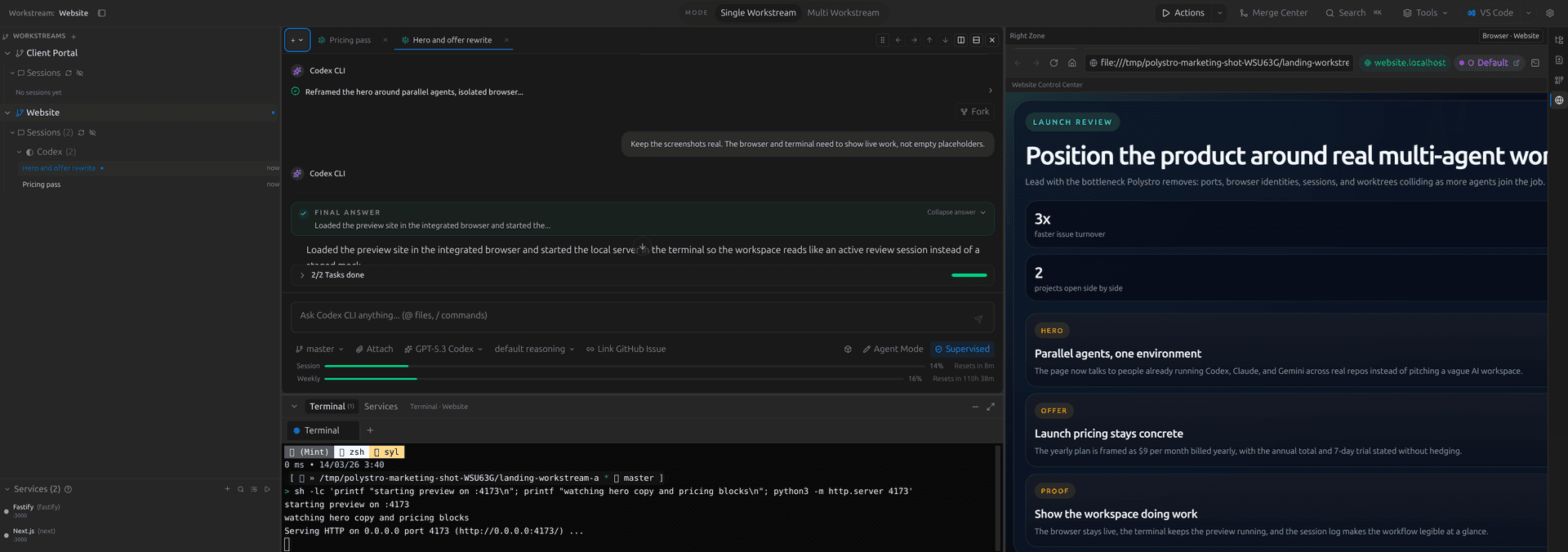
Once services are running, open previews through the integrated browser so the routed hostname, browser identity, and current workstream stay aligned. This is the intended path for testing flows that touch auth, API calls, and UI state together.
Handle Port Conflicts
When an underlying service port changes or collides, the gateway layer can preserve the workstream-facing hostname. In practice that means the user-facing preview route stays more stable than raw localhost-based development usually allows.
Debug With Routing
If a preview still fails after the service boots, stop guessing. Check the resolved environment, confirm the routed hostname and actual port, and inspect service-specific overrides before you restart everything.
Best debugging order