The shell is designed for several live contexts, not one linear chat.
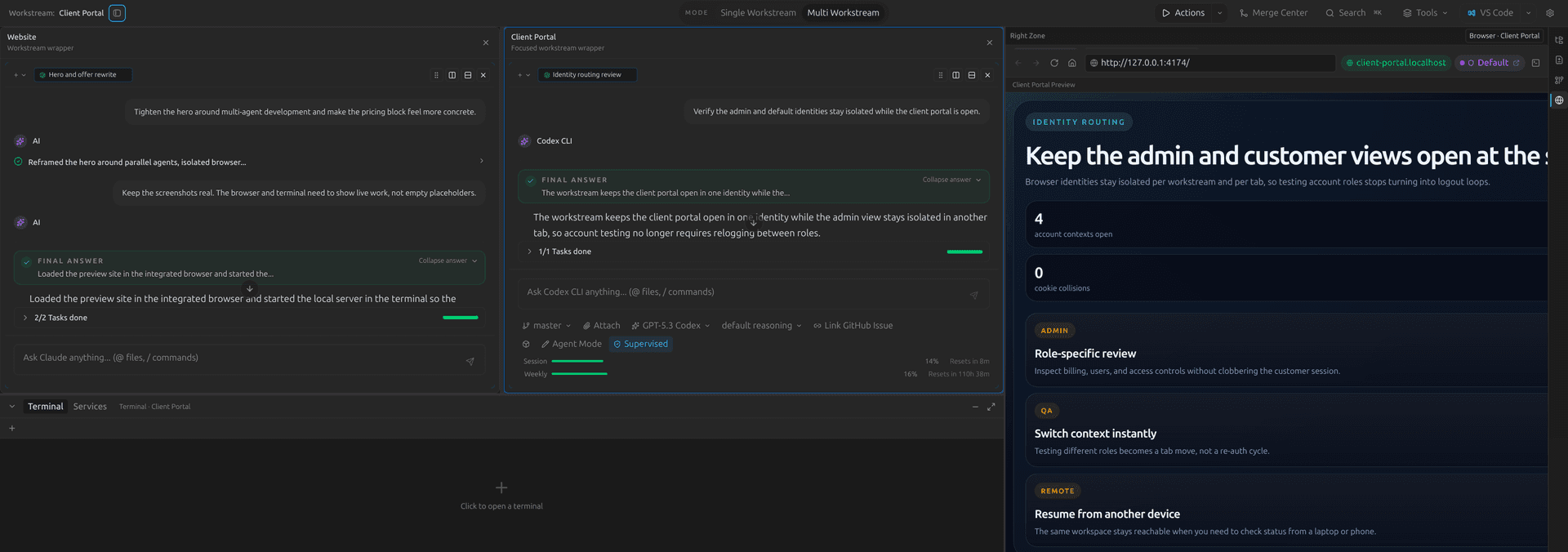
Polystro’s layout is part of the product model. The sidebar, agent tabs, pane system, terminal area, and workspace modes are all meant to help you supervise parallel work without collapsing everything into one transcript.
Agent Tabs
Active sessions are surfaced as tabs across the top of the conversation area. This lets you keep multiple CLIs or multiple sessions from the same CLI open at once, which is useful when one thread is building, one is reviewing, and another is answering a narrower question.
Docked Conversations
The center surface can switch from a single conversation into a docked layout with split panes, pane-local session binding, and tab movement between panes. This is Polystro’s answer to the reality that parallel work often needs parallel visibility too.
Terminal and Services
The lower shell area is where terminals and service logs stay mounted. It is intended to keep the operational side of a workstream visible while you supervise the agent conversation and browser preview.
Multiple terminal tabs
You can keep more than one terminal active inside the workstream shell.
Service logs in context
Service output stays near the session that depends on it instead of in detached terminal windows.
Target selection
The runtime target model lets the shell stay attached to the correct execution context.
Editor handoff
When you need an external editor, the shell can open files there without losing the surrounding context.
Workspace Modes
Single-workstream mode is for focused depth. Multi-workstream mode is for supervision across several active tracks. The key point is that the shell is built to support both without changing the underlying workstream model.